
AION™ Reliability LMS
The lubrication engineer's workdesk. Schedules, route sheets, oil analysis, calculators and training for every facility, in one place.
Starter is free: one user, one facility.
A lubrication programme is hundreds of small jobs
The problem comes in three parts. These are the day-to-day gaps the app is built to close.
Tasks slip
Greasing and oil changes live in spreadsheets and memory, so overdue work is found late.
Results scatter
Oil analysis reports arrive as PDFs and are rarely compared with the last sample.
Know-how stays in heads
Who is qualified for which task is seldom written down, or checked against the schedule.
AION™ Reliability LMS keeps all three in one place, for every facility.
One desk for the whole programme
Eight parts, one login. The schedule, route sheets and lube cards are on every plan. Oil analysis, calculators, training and competence tracking are part of the Professional plan.
Lube schedule
Every lube point, due date and quantity.
Route sheets
Work the round from a phone.
Oil analysis
Samples graded against limits, with trends.
Plant health
One score from every asset's condition.
Calculators
Twelve engineering tools.
Training
Study, mock exams and hands-on labs.
Competence
Who is qualified for which task.
Reports
Condition report as a PDF.
Facility, then site, then route
Everything hangs from the facility. A small plant can skip sites altogether, and a route can sit in one site or cover the whole facility.
Facility
A plant or mine you operate. Record what it is, how it runs and the conditions its lubricants work in.
Site
A part of a large facility, such as a crushing plant, a mill or a pump house, with its own page and numbers.
Route
The round a technician walks, for example a crushing daily round.
Asset
A machine with its lube card, for example jaw crusher JC-01.
Lube point
Each nipple, sump or breather, for example toggle bearings.
With several facilities, a Viewing selector in the menu lets you see one facility or all of them. The overview, routes, schedule, assets and oil analysis all follow it, and the choice is remembered between visits.
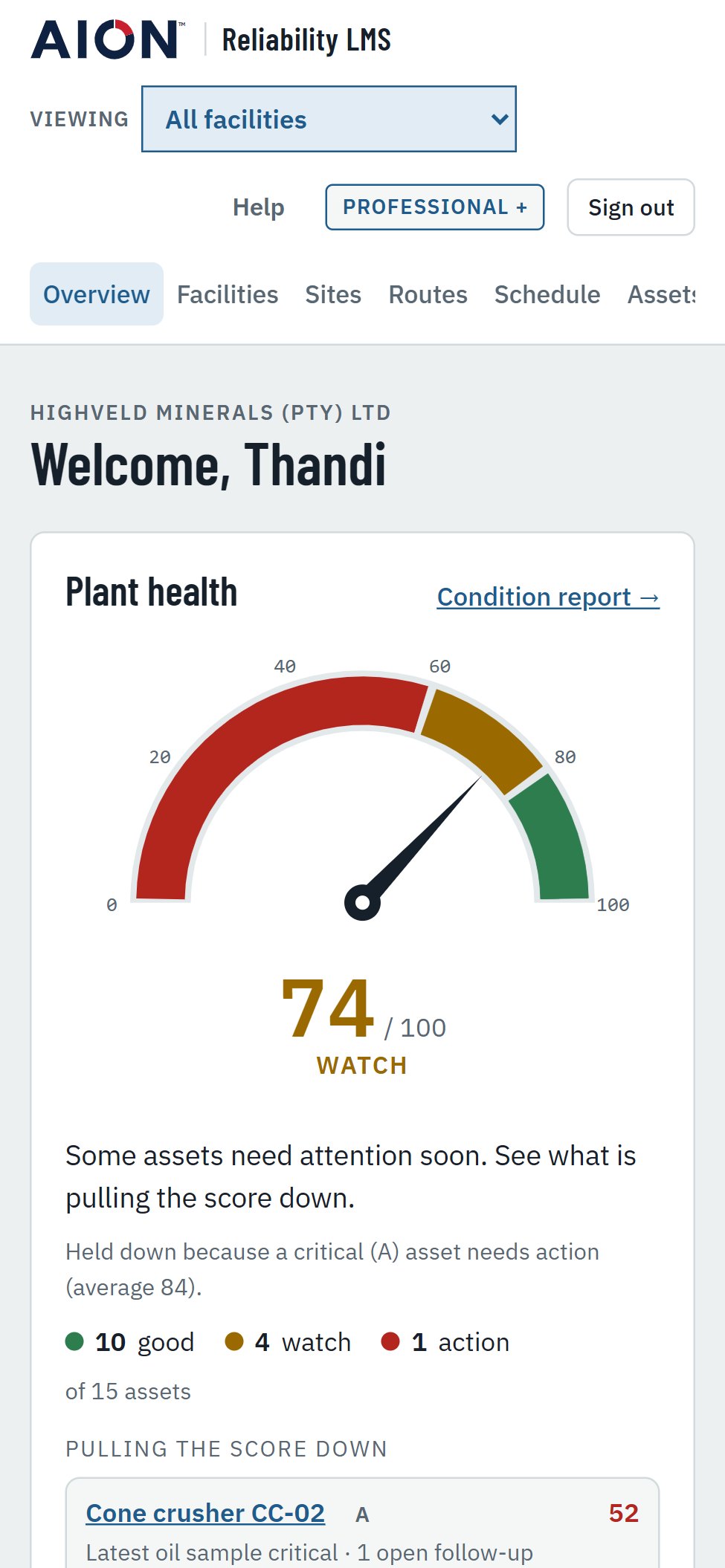
Open the app to the plant's health
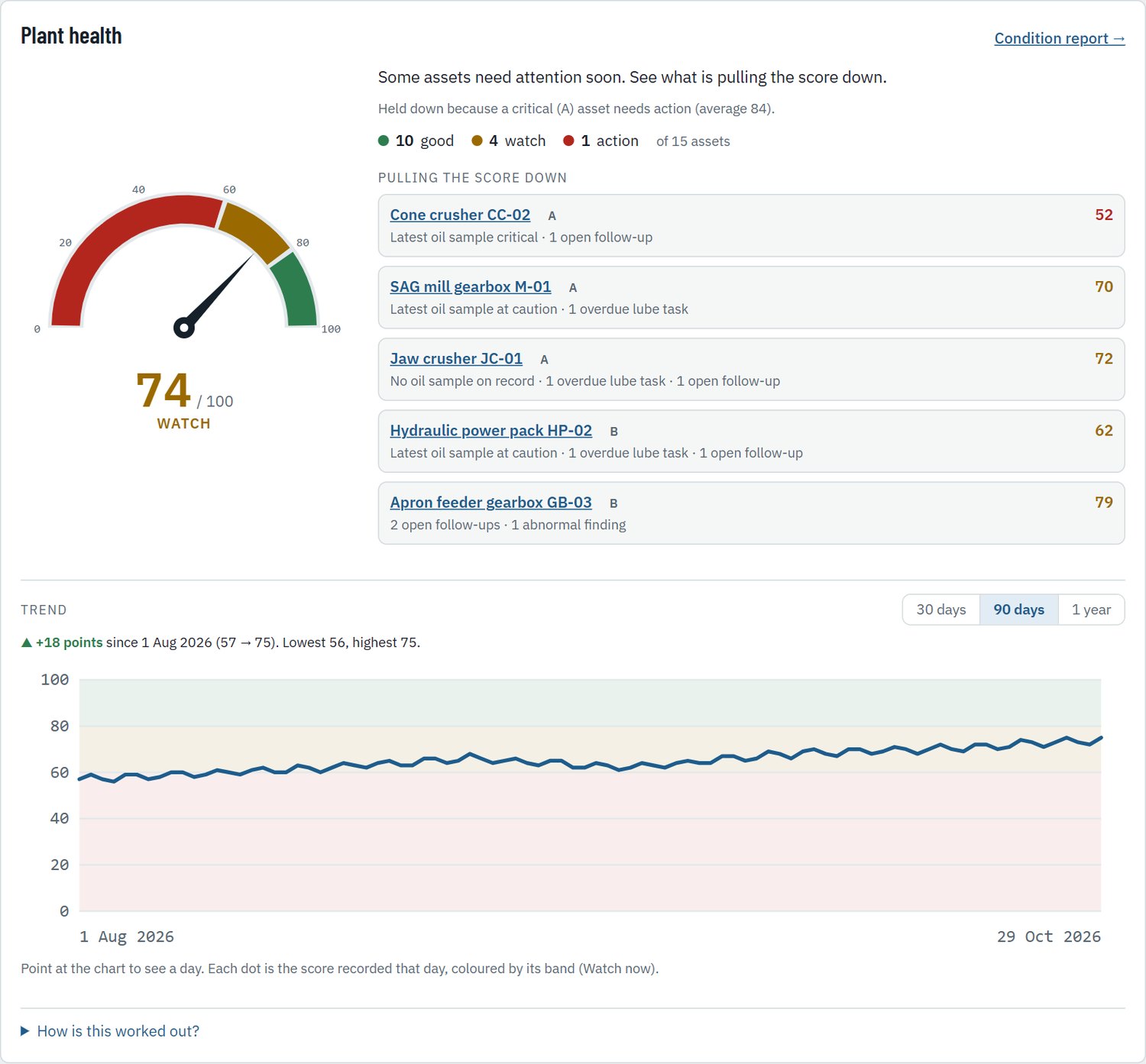
The Overview starts with a dial that scores the plant from 0 to 100. It is the first thing a manager sees.
- Red, amber and green zones with a needle
- The assets pulling the score down, and why
- Overdue tasks, follow-ups and oil alarms below
- Follows the facility you are viewing
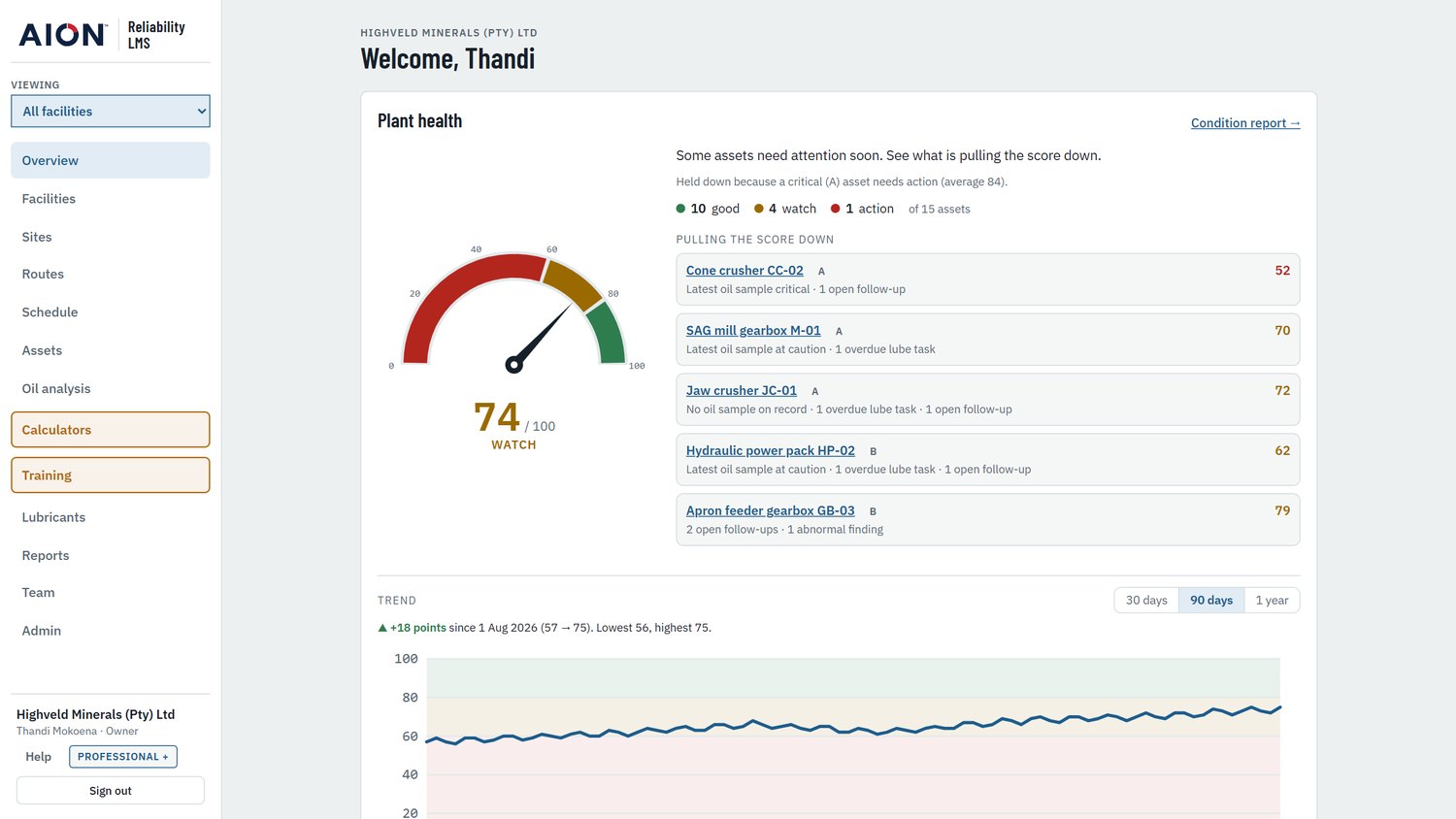
See whether the plant is getting better
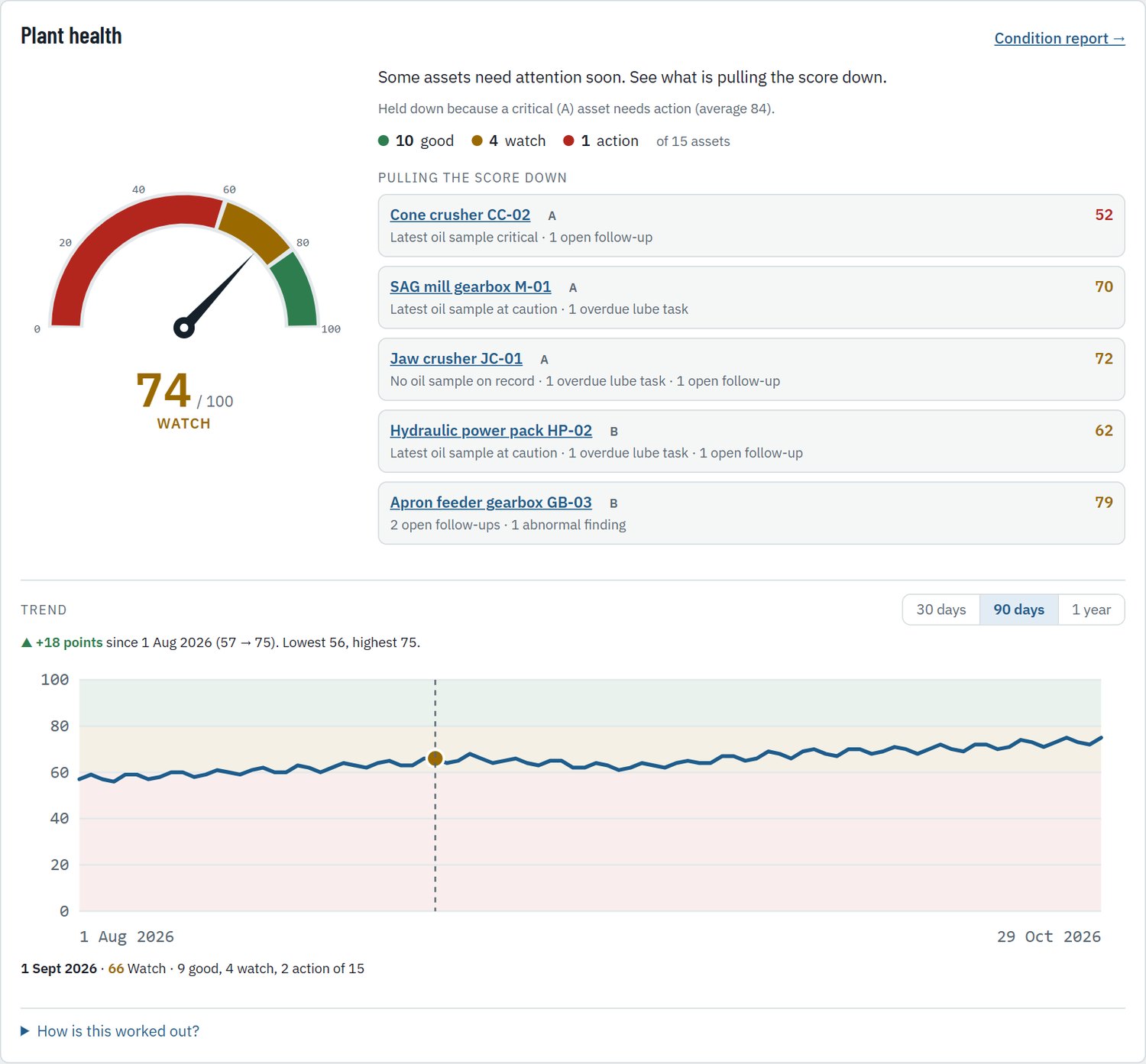
One point a day, for the company and for each facility.
- Thirty-day, ninety-day and one-year views
- Point at a day to see how many assets were good, watch or action
- The history starts the day a company first uses the app
The chart shown uses sample history for illustration.
Every asset starts at 100 and loses points
The arithmetic is deliberately simple, so a reader can check it by hand.
| Problem on an asset | Points lost |
|---|---|
| Latest oil sample critical or caution | 40 or 20 |
| Oil sample out of date | 10 or 20 |
| Temperature critical or caution | 25 or 10 |
| Overdue lube tasks | 10 each, up to 30 |
| Open follow-ups | 8 each, up to 24 |
| Abnormal route findings | 5 each, up to 15 |
A follow-up open for over two weeks costs 4 more. An A asset that has never been sampled loses 10.
Weighted by criticality. A assets count 5, B assets 3 and C assets 1 in the plant average. Held down by critical assets. One A asset in Action keeps the plant at 74 or below. Two keep it at 59 or below.
Route sheets for the person on the plant
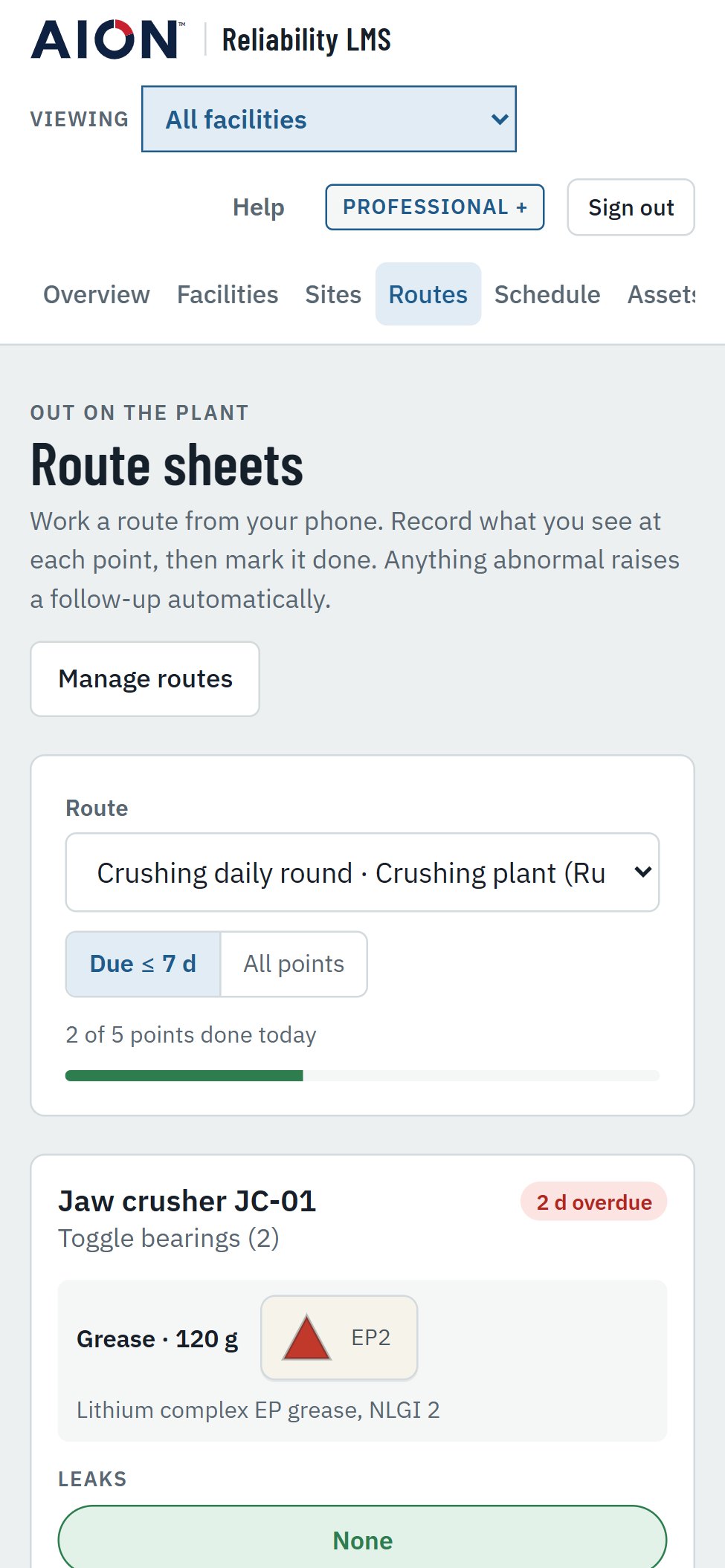
Work a round point by point, then mark each one done.
- Record oil level, appearance, leaks and noise with one tap
- Enter the quantity applied and the temperature
- Anything abnormal raises a follow-up automatically
- A progress bar shows the round done today

Made for a phone on the plant floor
No paper and no retyping. The same app runs in a phone browser.
- Nothing to install: open the address and sign in
- Large tap targets for the checks and the Done button
- The route lists its points in due order
- Work recorded on the plant updates the schedule at once
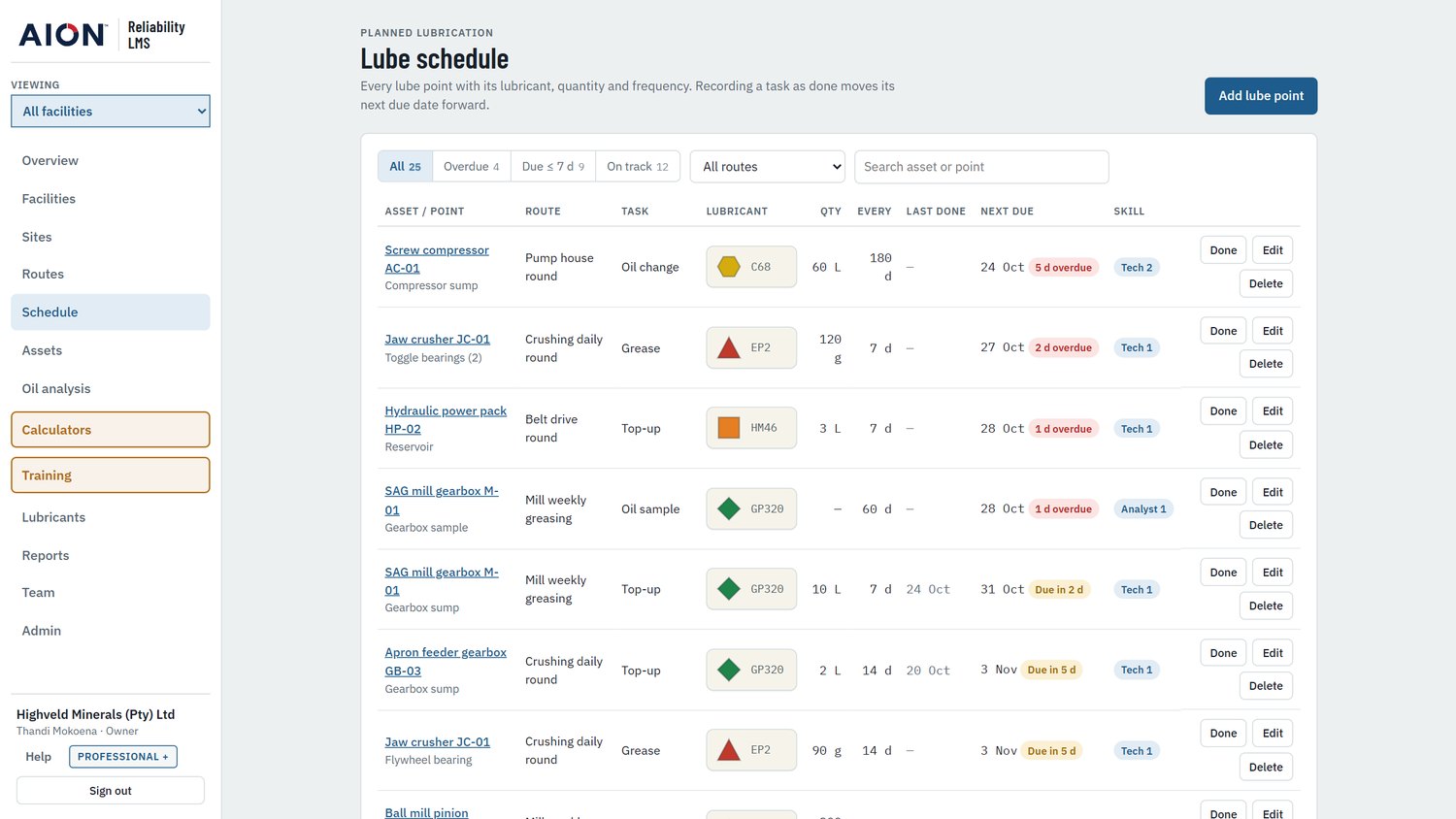
Every lube point on one schedule
Each point carries its lubricant, quantity, frequency and the skill it needs.
- Lubricant ID tags use a colour and a shape
- Filter by overdue, due soon or route
- Marking a task done moves its next date forward
- The skill level shows who may do the task
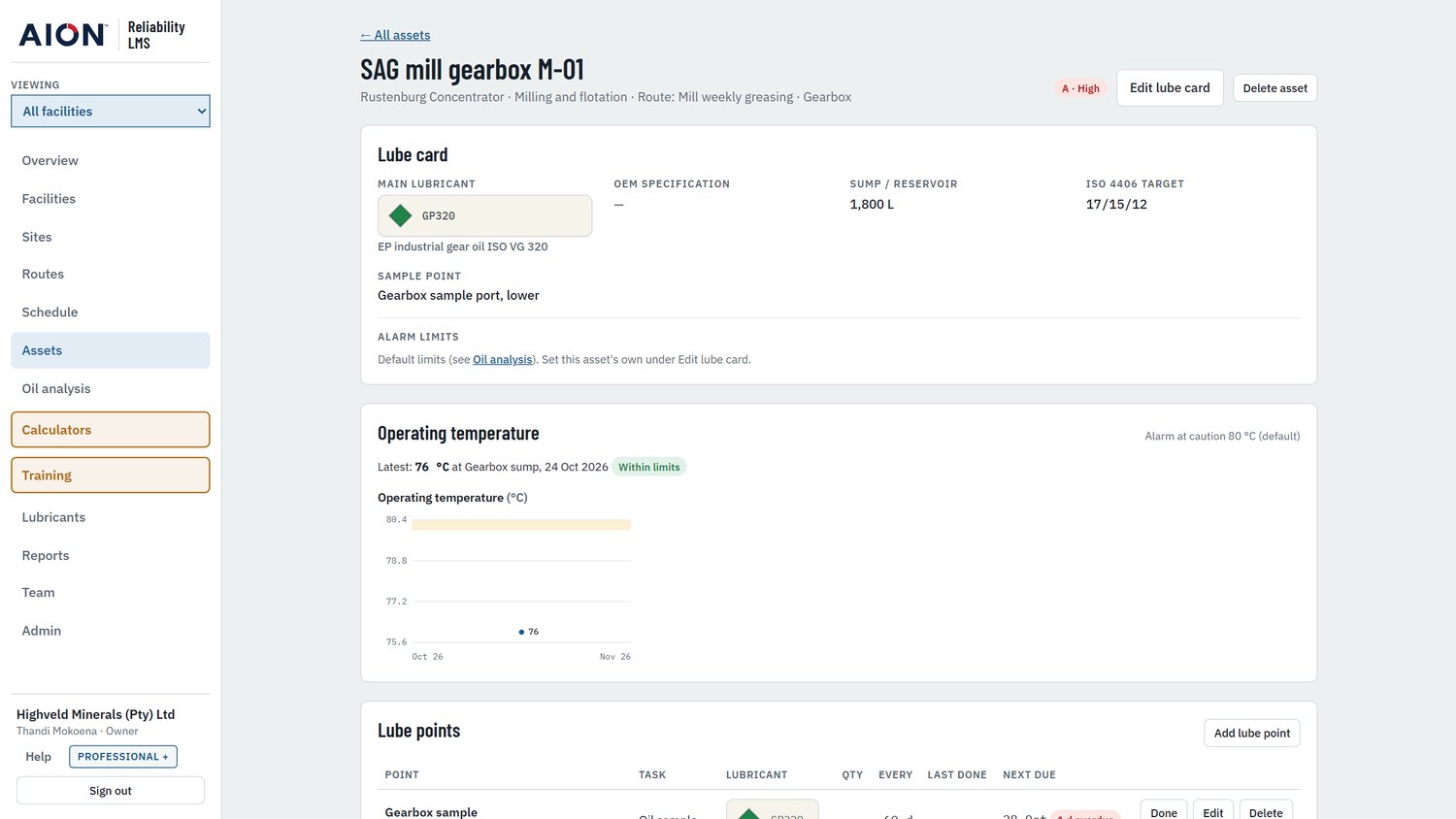
A lube card for every asset
Everything a technician or analyst needs to know about one machine.
- Main lubricant, OEM specification and sump volume
- ISO 4406 cleanliness target and sample point
- Alarm limits and operating temperature history
- Criticality A, B or C sets how much it matters
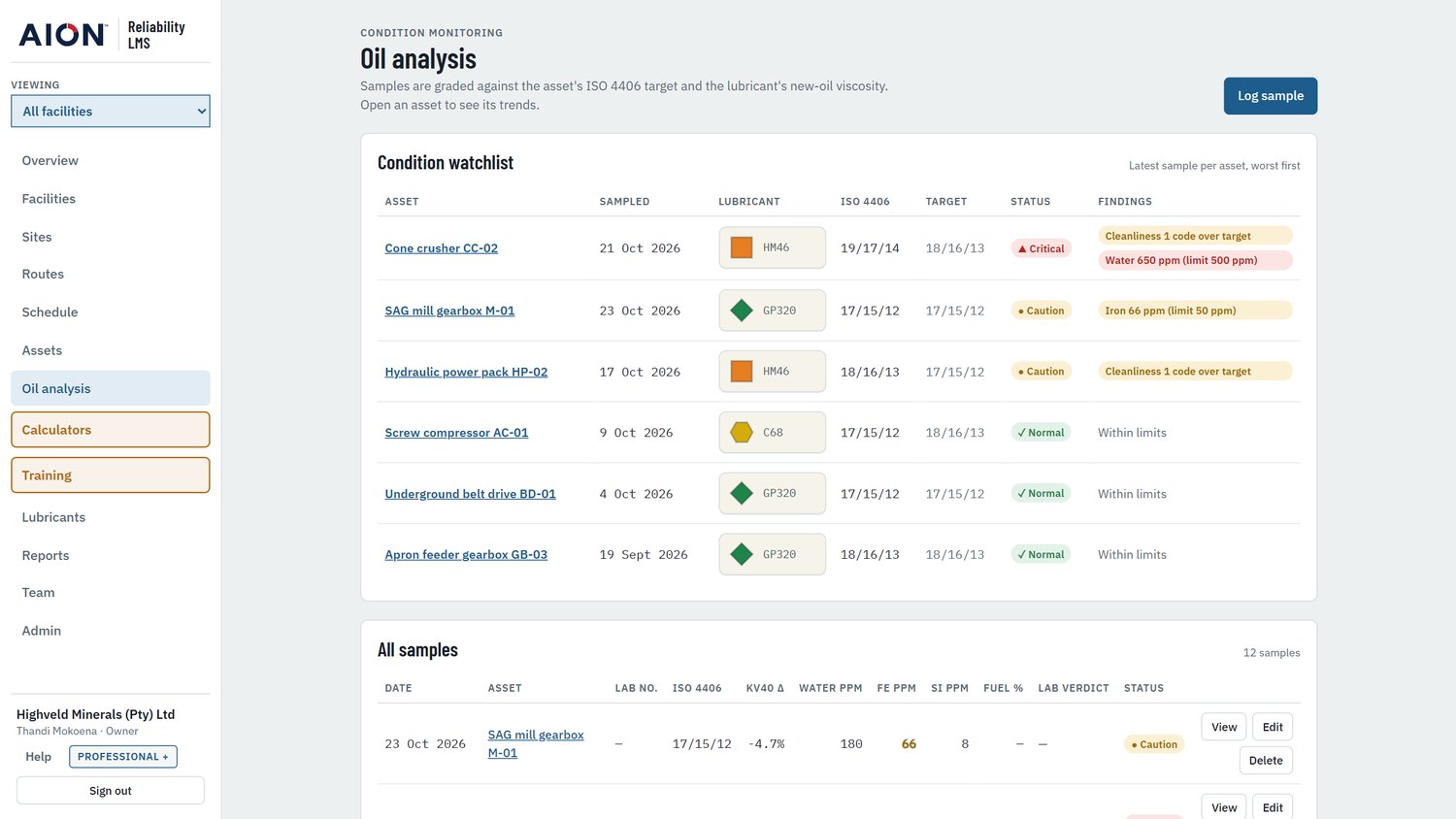
Oil analysis graded against limits
Every sample is graded normal, caution or critical. Oil analysis is part of the Professional plan.
- Cleanliness against the asset's ISO 4406 target
- Water, wear metals and viscosity change from new
- The watchlist puts the worst asset first
- The lab's own verdict counts too
Trends show where an asset is heading
One sample can look fine on its own. The trend is what shows iron climbing while viscosity slowly thins.
- Cleanliness, viscosity change, iron, silicon and water charted per asset
- Caution and critical bands are drawn on each chart
- Add other trends, such as copper or acid number, with a tap
- Every result is listed by sample, with the lab's diagnosis

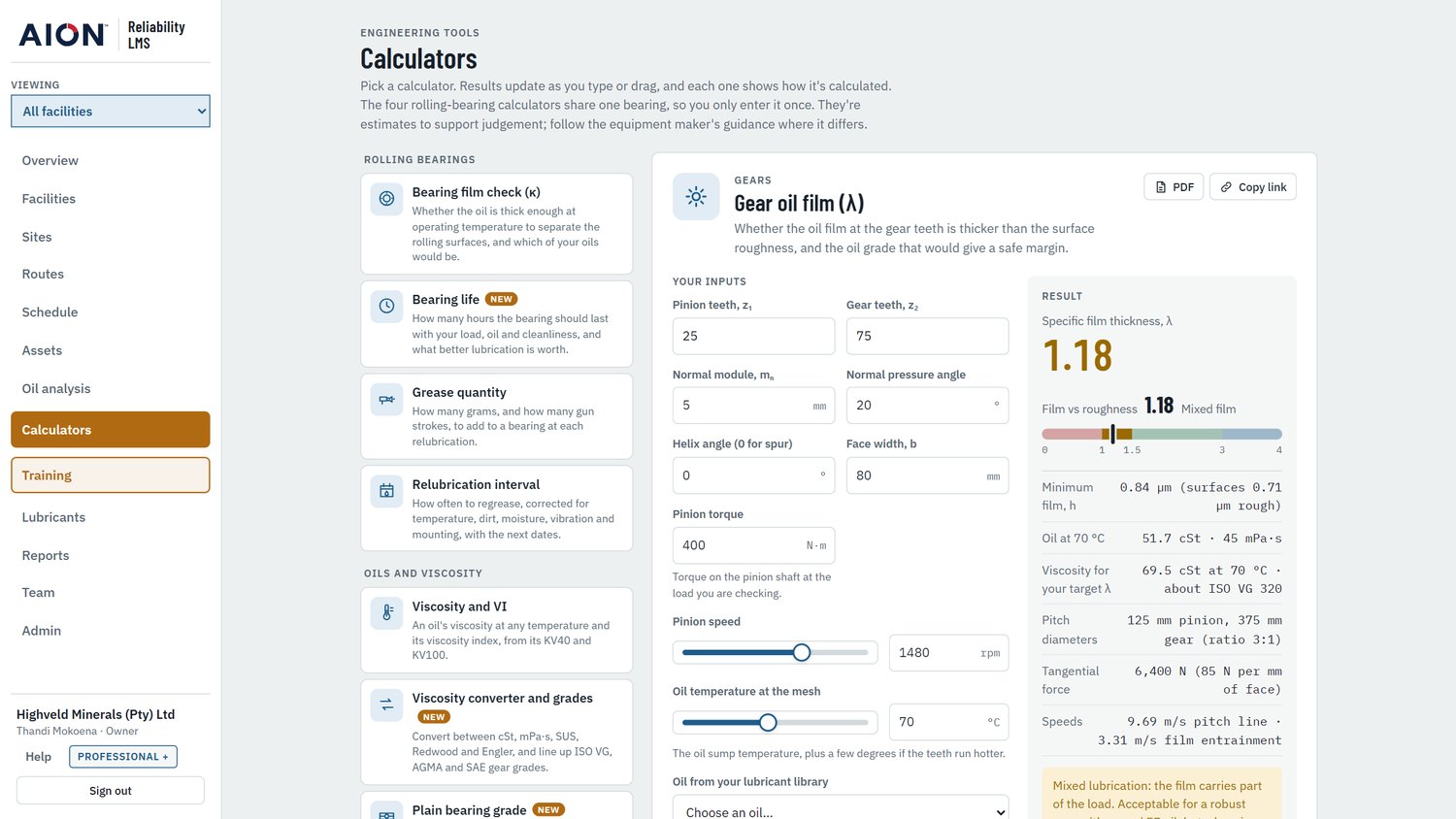
Twelve calculators for everyday decisions
Results update as you type, and each calculator shows how it is calculated. Calculators are part of the Professional plan.
- Rolling bearings: film check, bearing life, grease quantity, relubrication interval
- Oils and viscosity: viscosity and VI, unit converter and grades, plain bearing grade, blends, oil life
- Gears: gear oil film, and the grade for a safe margin
- Contamination: ISO 4406 cleanliness code, filter beta ratio
Estimates to support judgement. Follow the equipment maker's guidance where it differs.
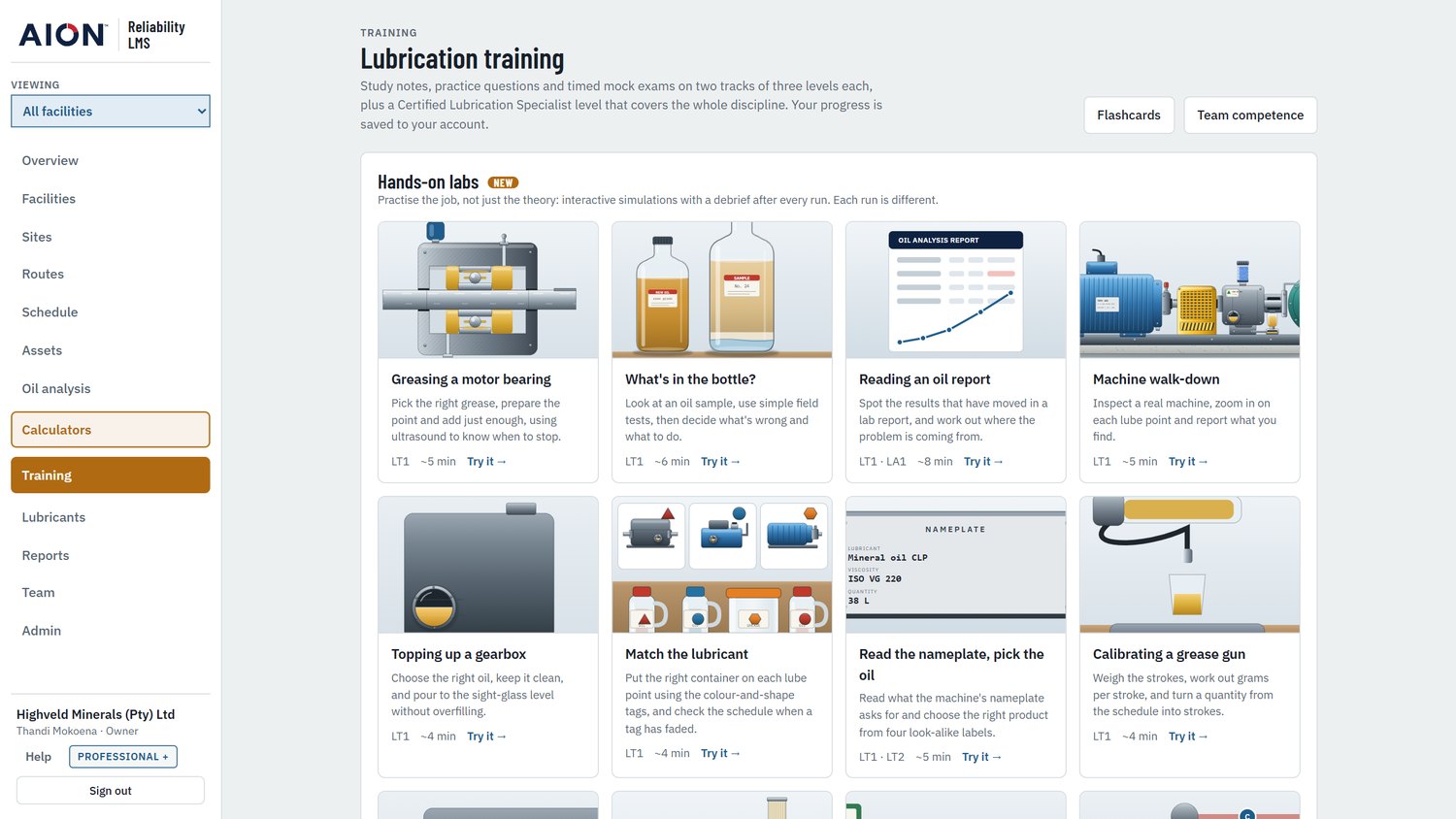
Training with hands-on labs
Two tracks of three levels, Lubrication Technician and Lubricant Analyst, plus a Certified Lubrication Specialist level. Training is part of the Professional plan.
- Study notes, practice questions and flashcards
- Timed mock exams
- More than a dozen interactive labs
- Progress saved to each person's account
Know who is qualified for what
A register of certifications, checked against the lube schedule.
- ICML certifications and CLS, with expiry dates
- Skill coverage compares lube points with qualified people
- Renewals due in the next 90 days are listed
- Only active users of the company can be added
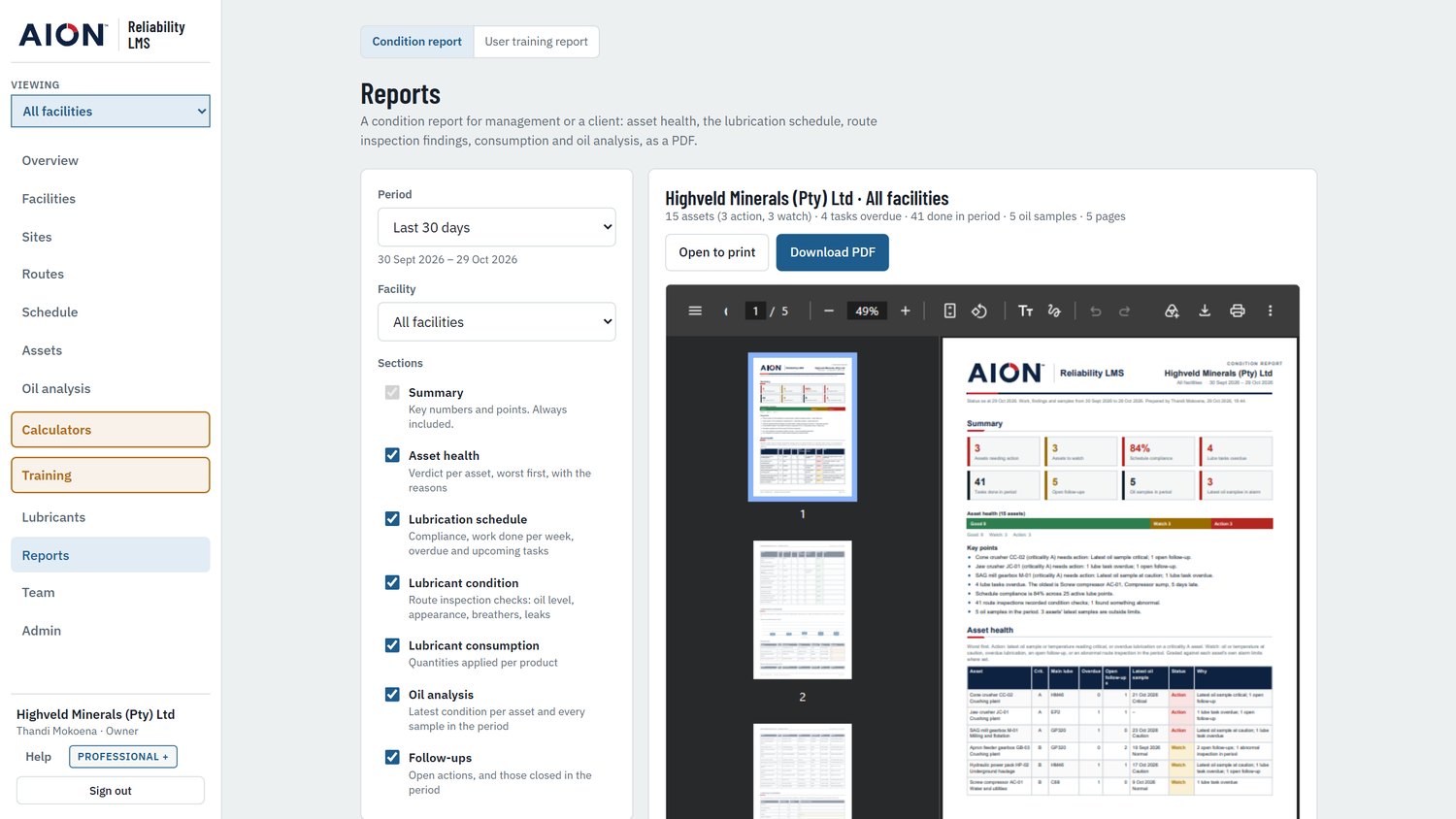
A condition report as a PDF
Choose the period and facility, check it on screen, then download it. Ready for management or a client.
- Asset health, schedule, route findings and consumption
- Oil analysis and follow-ups in the same report
- A training report covers study and competence
Who sees and changes what
An admin chooses which facilities each person can see and work in. Each company's data is kept apart from every other company's.
- Hosted in South Africa. AWS Africa (Cape Town) region.
- Verified sign-in. Email confirmed with a code, and a password strength rule.
- Terms and privacy. Accepted at sign-up, with the version and time recorded.
| Role | What it can do |
|---|---|
| Owner | Full control; can hand over ownership |
| Admin | Facilities, team and settings |
| Engineer | Assets, sites, routes and lube points |
| Technician | Records route work and findings |
| Viewer | Reads everything, changes nothing |
Start free, add the team when ready
Prices are in South African rand and include VAT.
- 1 user, 1 facility
- Assets and lube cards
- Schedule and route sheets
- Findings and follow-ups
- Lubricant library
- 3 users, 1 facility
- Everything in Starter
- Oil analysis and trends
- Calculators
- Training and mock exams
- Team competence
- 10 users, 5 facilities
- Everything in Professional
- As many users and facilities as you need
- Everything in Professional +
- Priority support
Try it on your own plant
Starter is free: one user, one facility, no card needed. It is enough to build a facility's asset register, lube cards, schedule and route sheets. Upgrade to Professional for oil analysis, calculators, training and team competence.
Questions and support: support@revolutionoil.co.za
All screens shown use sample data from a demonstration mining company, not real customer data.